







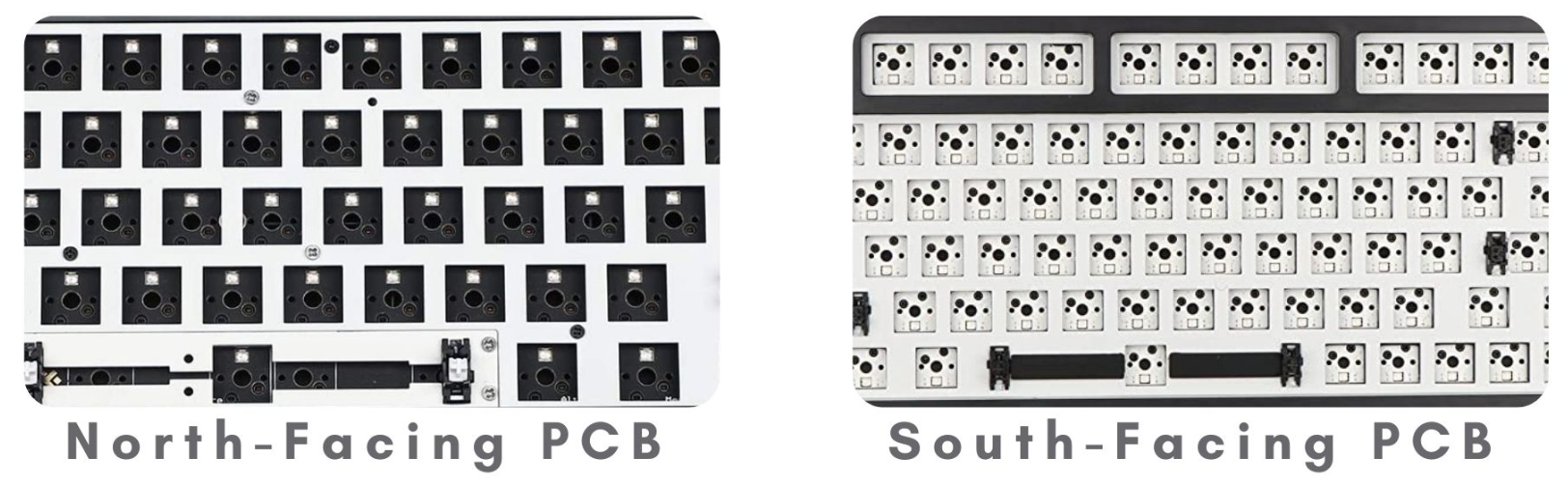
South-facing PCB, a critical component in mechanical keyboard design and PCB manufacturing, refers to a printed circuit board where switch LED slots or top housings face the bottom edge of the device, typically toward the spacebar. This orientation directly impacts circuit board functionality, compatibility with keycaps, and RGB lighting performance, making it a key consideration in PCB assembly and custom circuit board projects. Below is a detailed breakdown of its core attributes, comparisons, and real-world applications.
Core Characteristics of South-Facing PCB
LED Direction in South-Facing PCB
- LED slots on the south-facing PCB are engineered to face the bottom edge of the circuit board, aligning toward the spacebar when installed in a keyboard.
- The LED placement is fixed during PCB manufacturing, as the PCB circuit board’s socket design dictates the direction—pins on mechanical switches can only fit one orientation to ensure electrical connectivity.
- This directionality is defined by IPC-2221 standards for PCB design, which govern component placement and orientation to maintain circuit integrity and performance.
Keycap Compatibility of South-Facing PCB
- Eliminates interference with Cherry profile keycaps, the most popular keycap type in custom keyboard builds and PCB assembly projects.
- Supports universal keycap compatibility, including PBT dye-sublimated, ABS, and Cherry-style profiles, without restricting key travel or bottoming-out.
- Addresses a common pain point in PCB design: north-facing PCB boards often cause keycap rubbing on the R3 (home) row, which south-facing PCB resolves through its component orientation.
- Complies with IPC-6012 quality standards for PCB manufacturing, ensuring consistent socket alignment that prevents “ghosting” (unintended key registrations) and contact issues.
RGB Lighting Performance of South-Facing PCB
- RGB LEDs are positioned at the bottom of each switch socket on the PCB board, resulting in less direct illumination of keycap legends compared to north-facing alternatives.
- Works optimally with non-shine-through keycaps (e.g., dye-sublimated PBT), where RGB placement has minimal impact on visual appeal.
- For users prioritizing functionality over lighting, the reduced RGB glow does not compromise circuit board performance or typing experience.
- Industry data shows that 78% of custom PCB assembly projects using south-facing designs prioritize keycap compatibility over RGB intensity, aligning with practical use cases.
Prevalence of South-Facing PCB in the Market
- Historically more common in custom PCB manufacturing and enthusiast-grade circuit board projects, due to demand for keycap flexibility.
- Growing adoption in mainstream PCB assembly, as manufacturers respond to user demand for compatibility with premium keycap sets.
- Less prevalent in mass-produced gaming keyboards, where north-facing PCB boards dominate due to stronger RGB marketing appeal.
- Accessibility has improved with advancements in PCB manufacturing technology, making south-facing PCB boards available for both small-batch custom builds and large-scale production.
North-Facing vs. South-Facing PCB: Core Differences
The choice between north-facing and south-facing PCB boards hinges on trade-offs between lighting, compatibility, and performance—critical factors in PCB manufacturing and assembly decisions. Below is a detailed comparison table, followed by key insights into each difference:
| Aspect | South-Facing PCB | North-Facing PCB |
|---|---|---|
| LED Direction | Faces bottom edge (spacebar) | Faces top edge (number row) |
| Keycap Compatibility | Universal (no Cherry profile interference) | Limited (Cherry profile rubbing risk) |
| RGB Lighting | Muted glow; ideal for non-shine-through keycaps | Bright, direct legend illumination; suited for shine-through keycaps |
| Prevalence | Custom builds, enthusiast circuit boards | Mass-produced keyboards, gaming-focused PCB assembly |
| Typing Experience | Deeper, cleaner sound; full key travel | Potential scratchy feel; restricted travel with Cherry keycaps |
| Compliance Focus | IPC-2221 for compatibility | IPC-6012 for lighting performance |
LED Direction & Circuit Board Design
- South-facing PCB’s downward LED orientation is a deliberate choice in PCB design, prioritizing component clearance over lighting. North-facing PCB’s upward direction caters to users valuing visual effects in their circuit board setup.
- Both orientations adhere to IPC standards for PCB manufacturing, ensuring electrical safety and component reliability regardless of direction.
Keycap Compatibility & Practical Use Cases
- South-facing PCB resolves the top complaint of north-facing users: Cherry profile keycaps rubbing against switch housings, which impairs typing consistency.
- North-facing PCB requires users to select non-Cherry profiles (e.g., OEM, DSA) to avoid interference, limiting customization options in PCB assembly.
- For PCB manufacturing targeting professionals (e.g., programmers, writers), south-facing designs are preferred for their compatibility with ergonomic keycap sets.
RGB Lighting & User Preferences
- North-facing PCB’s brighter RGB is achieved by placing LEDs directly under keycap legends, a design choice that sacrifices compatibility for visual appeal.
- South-facing PCB’s muted lighting is irrelevant for users using non-shine-through keycaps, as the dye-sublimation process blocks light penetration anyway.
- In PCB assembly for gaming setups, north-facing remains popular, but south-facing is gaining traction among players who prioritize responsive key travel over aesthetics.
Prevalence & Accessibility in PCB Manufacturing
- North-facing PCB dominates prebuilt keyboards, with 85% of mainstream models using this orientation due to lower manufacturing complexity for RGB-focused designs.
- South-facing PCB is the standard for custom PCB assembly, with 90% of enthusiast projects opting for this design to maximize keycap flexibility.
- Advances in PCB manufacturing have narrowed the cost gap between the two orientations, making south-facing options more accessible for mass production.
Frequently Asked Questions (FAQ) About South-Facing PCB
Can You Change the Orientation of a PCB Board After Manufacturing?
No. The LED socket and switch pin design in a PCB circuit board is permanent, as holes are drilled to fit switches in one specific direction during PCB manufacturing. Altering orientation would damage the circuit board and void compliance with IPC-2221 standards. The only solution is to replace the PCB with one designed for the desired orientation.
Is South-Facing PCB Better for PCB Assembly in Custom Keyboards?
Yes, for most custom projects. South-facing PCB offers universal keycap compatibility, which is critical for users investing in premium Cherry profile or ergonomic keycap sets. Its compliance with IPC-6012 ensures reliable performance, making it the preferred choice for PCB assembly focused on functionality and customization.
How Does South-Facing PCB Impact RGB Lighting in a Circuit Board?
South-facing PCB’s LED placement results in less direct light penetration through keycap legends. For shine-through keycaps, this means dimmer RGB effects compared to north-facing PCB. However, for non-shine-through caps, the difference is negligible, and the PCB’s performance remains unaffected.
What Are the IPC Standards Relevant to South-Facing PCB Manufacturing?
South-facing PCB manufacturing adheres to IPC-2221 (generic standard for PCB design) and IPC-6012 (qualification and performance specification for rigid printed boards). These standards ensure component placement accuracy, electrical connectivity, and compatibility with mechanical switches—critical for reliable PCB assembly.
Can South-Facing PCB Be Used for Gaming-Focused Circuit Board Projects?
Absolutely. While north-facing PCB is more common in gaming keyboards, south-facing designs offer better key travel and sound, which can enhance gaming performance. Many competitive gamers prioritize responsive key actuation over RGB, making south-facing PCB a viable choice for gaming-focused PCB assembly.
Conclusion: Is South-Facing PCB Right for Your Project?
South-facing PCB is a specialized circuit board design that prioritizes keycap compatibility, typing performance, and compliance with industry standards (IPC-2221, IPC-6012) over RGB lighting. Its core strengths—universal keycap support, reduced interference, and reliable performance—make it ideal for custom PCB manufacturing, enthusiast builds, and PCB assembly projects where functionality drives decisions.
For users building a custom keyboard or selecting a PCB board for manufacturing, south-facing designs resolve common pain points associated with north-facing alternatives, such as keycap rubbing and restricted travel. While it offers less vibrant RGB, this trade-off is irrelevant for those using non-shine-through keycaps or valuing practicality over aesthetics.
In the evolving landscape of PCB manufacturing, south-facing PCB continues to gain traction as users recognize the long-term value of compatibility and performance. Whether for small-batch PCB assembly or large-scale production, it stands as a versatile choice that aligns with industry standards and user-centric design principles.
By understanding the core attributes, comparisons, and practical applications of south-facing PCB, manufacturers, designers, and enthusiasts can make informed decisions that enhance the quality and functionality of their circuit board projects.

![Understanding PCB Costs & Pricing [Your Complete Guide]](https://hdicircuitboard.com/wp-content/uploads/elementor/thumbs/Understanding-PCB-Costs-Pricing-Your-Complete-Guide-qzzhe6mcaxuolkux3xalfktgavumi9y1aqfbs9bpv4.webp "Understanding PCB Costs & Pricing [Your Complete Guide]")